Payouts

Payouts transfer funds from an Martis balance to external destinations such as bank accounts. This includes withdrawals to registered accounts and disbursements to third-party recipients. For transfers between Martis accounts, see Transfers.


Overview

The payout system supports two primary operations:

OperationDescriptionInitiated Via
WithdrawalTransfer available balance to a registered bank accountDashboard
DisbursementProgrammatic payment to any valid bank accountAPI

Payout Flow

The following diagram illustrates the payout process:
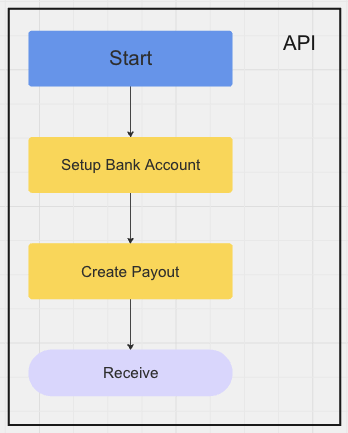
Payout Flow

Processing Times

Payout processing times depend on destination bank and submission time:

ScenarioProcessing Time
Same-daySubmitted during banking hours (9 AM - 3 PM WIB)
Next business daySubmitted after banking hours or on weekends
Bank holidaysProcessing resumes on the next business day

Payout States

A payout progresses through the following states:

  • Name
    pending
    Description

    Payout created, awaiting processing

  • Name
    processing
    Description

    Payout submitted to the banking system

  • Name
    completed
    Description

    Funds successfully delivered to the destination account

  • Name
    failed
    Description

    Payout failed due to validation or processing errors

  • Name
    cancelled
    Description

    Payout cancelled before processing

  • Name
    suspected
    Description

    Payout flagged for security or compliance review

  • Name
    rejected
    Description

    Payout rejected after review

  • Name
    refunded
    Description

    Funds returned to the source account


Withdrawals

Withdrawals transfer available balance to a registered bank account via the dashboard.

Initiate a Withdrawal

  1. Navigate to Balances in the dashboard

  2. Select the currency with sufficient available balance

    Withdrawal Button
  3. Click Withdraw and enter the amount

    Withdrawal Dialog
  4. Select a registered bank account

  5. Confirm the withdrawal request

  6. Track the payout status in Balance Reports

    Withdrawal Transaction

Disbursements

Disbursements send payments to third parties programmatically via the Payouts API.

Use Cases

  • Vendor and supplier payments
  • Employee reimbursements
  • Partner commissions
  • Customer refunds to external accounts

Example: Create a Disbursement

curl --location 'https://api-staging.martis.id/api/v1/payouts' \
--header 'Content-Type: application/json' \
--header 'Authorization: Bearer {API_KEY}' \
--data '{
  "amount": 500000.00,
  "currency": "idr",
  "destination": {
    "type": "bank_account",
    "bank_account": {
      "bank_code": "bca",
      "account_number": "1234567890",
      "account_holder_name": "Recipient Name"
    }
  },
  "description": "Vendor payment",
  "client_reference_id": "PO-2024-001"
}'

Example: Batch Disbursements

For multiple disbursements, iterate through recipients with separate API calls. Use the client_reference_id field to track each disbursement against internal records.

# Disbursement 1
curl -X POST 'https://api-staging.martis.id/api/v1/payouts' \
--header 'Authorization: Bearer {API_KEY}' \
--header 'Idempotency-Key: batch-001-recipient-1' \
--data '{"amount": 100000, "currency": "idr", "destination": {...}}'

# Disbursement 2
curl -X POST 'https://api-staging.martis.id/api/v1/payouts' \
--header 'Authorization: Bearer {API_KEY}' \
--header 'Idempotency-Key: batch-001-recipient-2' \
--data '{"amount": 150000, "currency": "idr", "destination": {...}}'

Balance Types

Account balances are categorized as:

TypeDescription
Available BalanceFunds ready for withdrawal or disbursement
Pending BalanceFunds in settlement from recent payments

Only the available balance can be used for payout operations.


Balance Reports

Monitor payout activity through the dashboard reporting tools:

ReportDescription
TransactionsPayment receipts with settlement status
PayoutsWithdrawals and disbursements with status tracking

Transactions Report

Payouts Report

Reports support filtering by date, amount, status, and reference ID. Export to CSV for reconciliation purposes.


Integration

Was this page helpful?