Charges
Martis enables businesses to accept payment charges from customers through multiple payment methods. Merchants are able to test payment charges through the Charges API, available through the Core API endpoints.
Martis's payment system handles the complete transaction lifecycle from payment charge creation to settlement, here's the overall flow process:
Remember to paste the Bearer token in the Authorization header with the secret key from generated API keys.
How Charges Work
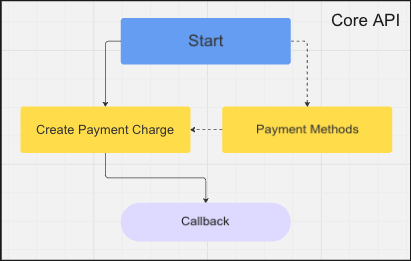
| Stage | Description |
|---|---|
| Payment Charge Creation | Created with amount, currency, and customer details |
| Payment Method Selection | Payment charges are generated based on the configured payment method |
| Customer Payment | The customer completes payment using the provided instructions |
| Confirmation | Callback URL is used to notify events to the merchant about the payment status |
| Settlement | Funds are settled to the merchant's available balance |
| Payouts | Settled funds can be withdrawn or disbursed |
Payment Methods
Merchants are able to define how their customers can pay for goods and services. Configuring the appropriate payment methods improves customer convenience and transaction success rates. Throughout all accounts, each account has its own separate payment method configuration.
Each payment method is integrated with the Charges API to process payments. A payment method exposes one or more payment channels. To determine which payment methods and channels are available on your account, use the payment channels endpoint.
To enable specific payment methods, contact our assigned team for further assistance.
Currently, here are the current available payment methods & channels in Martis:
QRIS
QR code-based payments compatible with mobile banking apps and e-wallets.
| Channel | Description |
|---|---|
shopee_pay | ShopeePay QRIS |
gudang_voucher | Gudang Voucher QRIS |
Virtual Account
Payment charges with the virtual account method is considered temporary. Once paid or failed to be completed, the number generated will be deleted. Each virtual account charges have two available options for it's number generation.
- Random number
- Fixed number
Below are the available payment channels for virtual account payment method:
| Channel | Description |
|---|---|
permata | Permata Virtual Account |
maybank | Maybank Virtual Account |
If the virtual account charge is made with a fixed number, creating another would generate the same number. Similarly with a permanent virtual account, but if it's completed or failed the number would expire and no longer available for payment. Both fixed and random numbers are considered to be a one-time payment only for virtual account charges.
To learn more about the differences between virtual account charges and actual virtual account payments, please read the Virtual Account section.
Payment Method Parameters
When creating a payment charge, specify the payment method and channel:
{
  "payment_method": "qris",
  "channel": "gudang_voucher"
}
For virtual account payment charges, additional options can be configured:
{
  "payment_method": "virtual_account",
  "channel": "maybank",
  "payment_method_options": {
    "virtual_account": {
      "account_name": "Customer Name",
      "account_number": null
    }
  }
}
When account_number is null, a unique virtual account number is automatically generated.
Lifecycle
A payment charge progresses through the following states:
- Name
pending- Description
Charge created, awaiting customer payment
- Name
success- Description
Payment completed — record is added to Balances > Transactions menu.
- Name
failed- Description
Payment failed or expired
Expiration
Payment charges expire if not completed within the specified timeframe. The default expiration period varies by payment method:
| Method | Default Expiration |
|---|---|
| QRIS | 30 minutes |
| Virtual Account | 24 hours |
Custom expiration times can be set via the expires_at parameter when creating a charge.